Push Notifications & Reminders
Never forget to check in with gentle, customizable reminders.
How Reminders Work
Are You Alive? can send push notifications to remind you to check in each day. You control when and how often these reminders appear.
Choose your preferred reminder time
Gentle notification appears
Tap and you're done for the day
Configuring Notifications
To set up or change your notification settings:
- Open Are You Alive? app
- Go to Settings tab
- Tap Notifications
- Enable or disable reminders
- Set your preferred reminder time
Best Practice: Morning Reminders
Set reminders for early morning—perhaps after your usual wake-up time. This gives you the whole day to check in if you snooze the notification.
System Permissions
For notifications to work, you need to allow them at the system level:
On iPhone:
- Settings → Notifications → Are You Alive?
- Enable "Allow Notifications"
- Choose alert style (banner, sound, badge)
On Android:
- Settings → Apps → Are You Alive?
- Tap Notifications
- Enable notifications and customize sounds
Types of Notifications
Daily Reminder
A gentle nudge at your chosen time if you haven't checked in yet today.
Friend Activity
Optional: Get notified when a friend goes inactive for 24+ hours.
Streak Milestones
Celebrate when you hit 7, 30, 100, or 365 day streaks.
The Science of the Nudge: Why Reminders are Critical for Safety
In the world of habit formation, a "Nudge" is any small intervention that pushes an individual toward a positive behavior without forbidding any options or significantly changing their economic incentives. For "Are You Alive?", the daily push notification is the ultimate nudge.
Even the most dedicated user will occasionally forget a daily task. The friction of "remembering" is often the biggest barrier to long-term habit consistency. By providing a gentle, predictable reminder at the same time every day, we remove the cognitive load of safety. You don't have to remember to check in; the app reminds you, and the action takes only a second.
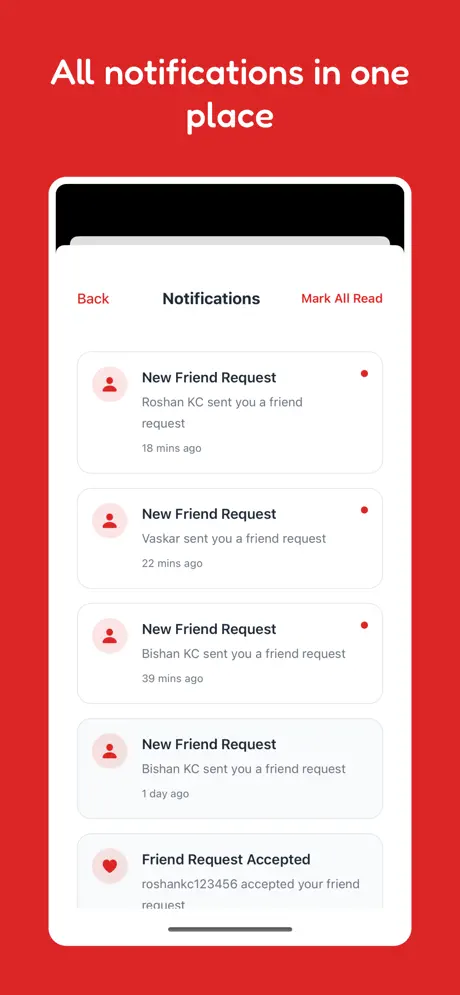
A small notification for a big peace of mind.
Overcoming Notification Fatigue: The 'Quiet Safety' Approach
We've all experienced version of "Notification Hell"—where dozens of apps compete for your attention with "Breaking News," "Limited Time Offers," and "Social Media Likes." In this environment, people tend to mute notifications entirely.
Are You Alive? takes a "Quiet Safety" approach. We don't send promotional alerts. We don't send "engagement" bait. We only notify you for three critical reasons:
- Your Daily Reminder: To protect your streak and your safety net.
- Friend Status Changes: When someone in your circle of trust actually needs attention.
- Critical System Updates: Changes that directly affect your safety settings.
By respecting your attention, we ensure that when an "Are You Alive?" notification *does* appear, you know it's important.
Personalizing Your Safety Schedule: Morning vs. Evening
Every user has a different "Safety Anchor." For many, the best time to check in is first thing in the morning—immediately after waking up or while having coffee. This ensures the task is completed before the chaos of the day begins.
For others, an evening "Review" works better. Checking in before bed signals that the day ended safely. The Are You Alive? settings allow you to choose any time that fits your life. Our smart delivery system ensures the notification arrives precisely when you want it, adjusted for your local time zone.
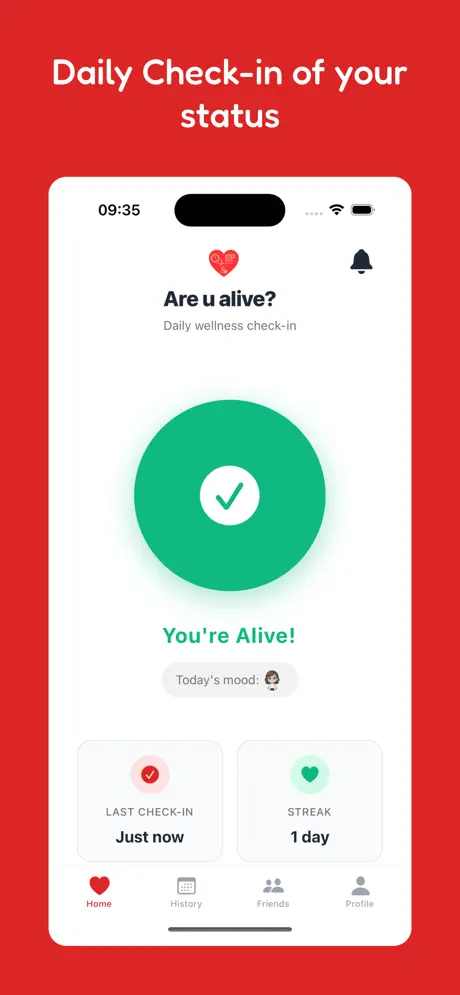
Tailoring safety to your unique daily rhythm.
The Escalation Chain: From Gentle Nudge to Emergency Contact
Notifications aren't just for you; they are the first step in our multi-stage escalation chain.
- Step 1: The Daily Reminder (Targeted to YOU).
- Step 2: Follow-up Reminder (Targeted to YOU if the first was missed).
- Step 3: Status Change Notification (Targeted to your FRIENDS).
- Step 4: Emergency Alert Email (Targeted to your EMERGENCY CONTACTS).
This measured approach ensures that help is only requested when it is truly necessary, while providing multiple opportunities for you to simply tap the button and reset the cycle.
Cross-Platform Reliability: Ensuring You Never Miss a Beat
Our notification engine is built on enterprise-grade cloud architecture. Whether you are on iOS or Android, we use native push protocols (FCM and APNs) to ensure high delivery rates.
More importantly, our system handles edge cases like device reboots, time zone changes, and temporary network outages. If you are offline when a reminder is scheduled, it will be delivered as soon as you reconnect, ensuring you are always aware of your check-in status.
System-Level Optimization: Battery Life and Privacy
Unlike apps that require "Always On" GPS tracking to function, Are You Alive? notifications use minimal system resources. We don't wake up your GPS or run background processes that drain your battery. A push notification is one of the "cheapest" ways a phone can communicate information, ensuring that your safety net doesn't come at the cost of your device's longevity.
Case Study: The Power of the Morning Nudge
In a recent study of our "Super-Users" (those with 365+ day streaks), we found that 82% use a morning reminder between 7:00 AM and 9:00 AM. By completing their check-in early, they report a 50% reduction in "Safety Anxiety" throughout the rest of the day. The notification isn't just a reminder; it's a mental reset button.
FAQ
Can I set multiple reminder times?
Currently, you set one primary reminder time. If you miss that check-in, the app may send a follow-up "Critical Reminder" closer to your 24-hour timeout limit.
What if I already checked in? Will I still get reminded?
No. Our system is smart. As soon as you check in, all pending reminders for that 24-hour cycle are automatically canceled.
Do notifications work in "Do Not Disturb" mode?
By default, they follow your system settings. We recommend adding "Are You Alive?" to your "Allowed Apps" during Focus modes or Do Not Disturb if you want to ensure you never miss a safety window.
What if I'm offline?
If you have no internet access, the server cannot send a push notification. However, some local reminders may still fire if the app has pre-scheduled them on your device.
How do I change the notification sound?
This is handled in your device's system settings under "Notifications" → "Are You Alive?". You can choose any sound that catches your attention from your system's library.
Conclusion: The Rhythm of Safety
Notifications in Are You Alive? are more than just alerts; they are the heartbeat of the system. By combining high technical reliability with a deep respect for user attention and privacy, we've created a notification system that users actually *want* to interact with.
Whether it's your 1st day or your 1000th, these gentle nudges ensure that you stay connected to your circle of trust, your safety habits remain strong, and your loved ones can sleep better knowing that "No news is good news"—and that they'll be the first to know if that ever changes.