Friend System
See who's alive without texting "are you okay?" every day.
How Friends Work
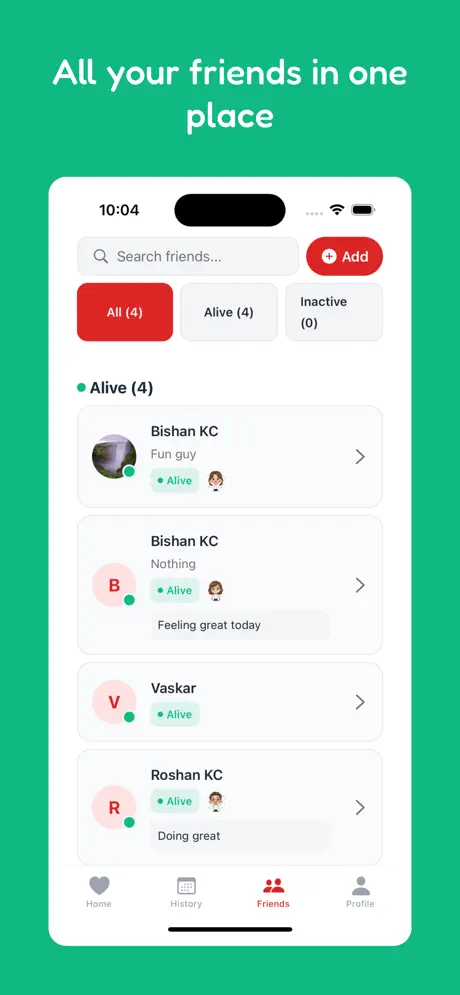
Connect with people you care about. Once connected, you can see each other's check-in status at a glance—no messages required.
Search by email or username
They confirm the connection
Alive or inactive at a glance
What You Can See
For each friend, you see:
- Status: "Alive" (checked in today) or "Inactive" (missed 24+ hours)
- Streak: Their current consecutive check-in streak
- Profile: Name, avatar, and optional bio
What you DON'T see: Location, messages, activity logs, or any personal data. Friends only see check-in status—nothing more.
The Power of Social Accountability
Research shows we're more likely to follow through on commitments when others are watching (even passively). The friend system leverages this:
- Mutual visibility: Knowing your friends can see if you've checked in creates gentle pressure to stay consistent.
- Passive monitoring: Check your friends' status without sending a message. No need to text "you okay?" every day.
- Early warning: If a friend goes "inactive," you can reach out proactively before emergency alerts trigger.
Finding Friends
Add friends in several ways:
- Email search: Enter their email address to find them
- Username search: Search by their app username
- Share your profile: Send a link so they can add you
Both people must accept the connection. You can't add someone who doesn't want to be visible to you.
Use Cases
- Family members: Siblings, parents, adult children—everyone sees everyone's status
- Roommates: Know if your roommate made it home okay
- Travel buddies: Backpackers on the same route can monitor each other
- Accountability partners: Wellness buddies keeping each other on track
- Remote colleagues: A low-key check that everyone's okay on distributed teams
The Philosophy of the Circle of Trust
Human beings are social creatures. Historically, our safety depended on the tribe—the people immediately around us who would notice if we went missing or were in distress. In the digital age, we've gained global connectivity but lost much of this local, immediate accountability.
The Are You Alive? Friend System is designed to rebuild this "Digital Tribe." It's not about social networking or vanity metrics; it's about creating a dedicated "Circle of Trust" where each person is committed to the well-being of the others. By connecting with just a few key people, you create a robust safety net that doesn't rely on centralized monitoring or intrusive GPS tracking.
Safety is a shared responsibility.
Social Accountability: The Science of Being Watched
Psychology tells us that the mere presence of others—even if they are just "passive observers"—significantly alters our behavior. This is known as the **Audience Effect.** In a safety context, this is a powerful ally.
Knowing that your friends can see whether you've checked in today provides a gentle, positive pressure to maintain your routine. It's not about being "policed"; it's about being "seen." This passive visibility is often all it takes to keep a daily accountability habit alive for years.
Passive Monitoring vs. Active Invasive Tracking
Many safety apps offer "Peace of Mind" through constant GPS tracking. We believe this is a false trade-off. Constant tracking creates two major problems:
- Privacy Fatigue: Users eventually find the tracking "creepy" and turn it off, leaving them with no safety net at all.
- Monitoring Burnout: Family members feel the need to constantly check the map, which increases their anxiety rather than reducing it.
Are You Alive? offers **Passive Monitoring.** You only share your *status*, not your *location*. This provides the essential information ("Is my friend okay?") without the invasive overhead of second-by-second location updates. It's the "Minimum Viable Data" for "Maximum Peace of Mind."
True safety respects your boundaries.
Building Your Safety Tribe: Who Should You Add?
While you can add unlimited friends, the most effective safety nets are composed of 3-5 high-trust individuals. We recommend a mix of:
- The Daily Contact: A spouse, roommate, or family member who you see or talk to regularly.
- The Distance Contact: Someone who doesn't live with you but cares deeply about your routine.
- The Local Responder: A neighbor or friend who could physically check on you if your status goes "Inactive."
By carefully curating your friend list, you ensure that every alert is greeted with the appropriate level of concern and action.
The Transparency Factor: Why Mutual Consent Matters
In the Are You Alive? ecosystem, there is no "secret" tracking. Every friend connection must be mutually accepted. You cannot "force" a follow on someone. This transparency is key to the trust model of the app. It ensures that everyone in the circle knows they are being watched over, and they've given their explicit permission for that visibility.
Use Cases: Beyond the Basics
While family safety is the primary use case, the Friend System is remarkably versatile:
- Solo Adventurers: Backpacking through Europe or hiking the PCT? Connect with other travelers on your route. If one person stops checking in, the others know where they were last active.
- Wellness Accountability: Working on a new habit or dealing with a mental health challenge? Use the friend system as a "Pulse Check" with your therapist or support group.
- Aging in Place: For seniors who value their independence, the global friend list allows their children—who might live across the country—to see their "Alive" status every morning without a disruptive phone call.
The Future: Circles and Roles
As we move through 2026, we are expanding the Friend System to include "Circles" (groups with shared visibility) and "Roles" (designating specific friends as primary responders). These features will allow for more complex safety organizational structures while maintaining our "Privacy First" core.
FAQ
How many friends can I have?
Unlimited! We don't believe in capping your safety net. Add as many people as you trust.
Can I remove someone?
Absolutely. You can unfriend anyone at any time from your profile settings. The connection is severed immediately, and they can no longer see your status.
Can I hide my status from specific friends?
Currently, the "Circle of Trust" is all-or-nothing. If you are friends with someone, they see your status. We recommend only adding people you are comfortable sharing your daily check-in with.
Are friends notified of every check-in?
No. We don't believe in spamming people. Your friends only see your status update when they actively open the app and look at their friend list. The exception is if they have specific notifications enabled for your status changes.
What if a friend goes Inactive?
If a friend's status changes to "Inactive," we recommend a gentle reach-out. A simple "Hey, saw you missed your check-in, hope everything is well!" is often all it takes to provide that layer of social safety.