The 24-Hour Timeout System
The core mechanic that makes daily accountability work.
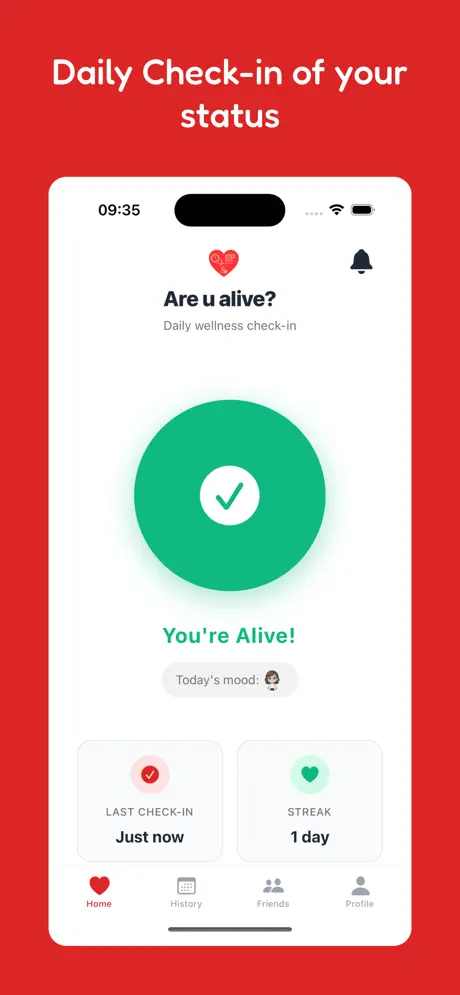
How It Works
Tap the heart button
Friends see you're okay
Status changes to inactive
Why 24 Hours?
We chose 24 hours because it strikes the perfect balance between:
- Not too short: You won't trigger false alarms just because you slept in or had a busy day.
- Not too long: If something actually happens, people will know within a day.
- Natural rhythm: Aligns with daily routines—check in once per day, every day.
What Happens When Time Runs Out?
0-24 Hours
Your status shows "Alive". Friends see a green indicator next to your name.
After 24 Hours
Your status changes to "Inactive". Friends see a gray/warning indicator. No emergency alert yet.
1-3 Days (Your Setting)
If you still haven't checked in, your emergency contacts receive an email notification.
Privacy Considerations
The timeout only reveals whether you've checked in—never where you are,what you're doing, or any other personal information. It's the minimum viable data for maximum peace of mind.
The Philosophy of the 24-Hour Cycle
At its core, "Are You Alive?" is built on the concept of the 24-hour cycle. This isn't an arbitrary number. Human life is fundamentally structured around the Earth's rotation. We sleep, eat, and work in 24-hour intervals. By aligning our safety mechanism with this natural rhythm, we create a system that feels intuitive rather than industrial.
The 24-hour timeout is the "Heartbeat" of our application. It is the minimum viable interval that provides meaningful safety without becoming a constant source of interruption. It respects the pace of life while ensuring that no more than a single day passes without a verification of safety.
Proactive vs. Reactive Safety: A Deep Dive
Most safety tools are **reactive.** A panic button requires you to press it. A GPS tracker requires someone to look at it. If you are unconscious, incapacitated, or simply in a situation where you cannot access your phone, these reactive tools fail.
The 24-hour timeout is **proactive.** It doesn't wait for a signal of distress; it looks for a signal of status. If that signal (the check-in) is missing, the system moves into action. This shift from "I'll tell you if I'm in trouble" to "I'll tell you that I'm okay" is the fundamental innovation of Are You Alive?.
The silence of a missing check-in speaks louder than any alarm.
The Science of Habit Formation: Why 24 Hours Works
Behavioral psychologists have long studied the "Habit Loop"—the process of cue, routine, and reward. For a safety app to be effective, it must become a habit. Longer intervals (like checking in once a week) are too infrequent to form a strong neural pathway. Shorter intervals (like every hour) are too frequent and lead to "Alert Fatigue."
The 24-hour check-in fits perfectly into the "Morning Routine" or "Evening Review." By tying the check-in to a daily event—like having coffee or charging your phone—the action becomes automatic. This reduces the cognitive load of safety to almost zero.
False Alarms vs. Real Emergencies: The Tuning of the Timeout
One of the primary concerns with automated safety systems is the "False Alarm." We've all experienced the frustration of a car alarm going off in the middle of the night for no reason. In the context of family safety, a false alarm can cause unnecessary panic and erode trust in the system.
The 24-hour window is expertly tuned to minimize these false alarms. It provides enough "buffer" for the variances of daily life. If you sleep in on a Saturday, or if you're on a long flight, you are unlikely to hit the 24-hour limit. By the time the status changes to "Inactive," it's a genuine indicator that something is out of the ordinary.

Providing the right amount of time for life to happen.
Universal Applicability: From Elders to Explorers
The beauty of the 24-hour timeout is its versatility.
- For Seniors: It provides a gentle daily check-in that feels like a "Good Morning" greeting to their children.
- For Solo Travelers: It ensures that if they go missing on a trek or in a new city, the search begins within 24-48 hours, not weeks later.
- For Mental Health: It acts as a daily "Pulse Check," encouraging individuals to acknowledge their own presence and status.
- For Remote Workers: It bridges the gap between colleagues and family, ensuring someone always knows they are active.
The Psychology of Peace of Mind
There is a profound psychological difference between "No News is Good News" and "Confirmed Good News." Without a check-in system, family members live in a state of passive anxiety. They assume you're okay, but they don't *know*.
Every time you tap that check-in button, you are sending a micro-burst of peace of mind to everyone who cares about you. You are saying, "I am here, I am safe, and I am thinking of you." The 24-hour timeout ensures that this cycle of reassurance is never broken.
Technical Implementation: Efficiency and Reliability
From a technical standpoint, managing millions of 24-hour timers requires a highly scalable architecture. Our backend is designed to handle these status changes with millisecond precision.
More importantly, we've optimized the app to function in low-connectivity environments. The check-in signal is a tiny packet of data—less than 1KB. It can be sent over a weak 2G signal or a crowded hostel Wi-Fi. This ensures that the 24-hour timeout works even when you're off the beaten path.
Customizing Your Safety Net: Beyond the Initial 24 Hours
While the 24-hour "Inactive" status is fixed, you have total control over what happens next. You can set your emergency alerts to trigger after 1 day, 2 days, or 3 days of inactivity. This allows you to customize the sensitivity of your safety net based on your lifestyle and the preferences of your emergency contacts.
FAQ
Can I change the timeout period?
The 24-hour timeout for status change is fixed by design. However, you can configure the emergency alert delay (1-3 days).
What if I'm traveling across time zones?
The app uses your local device time. Check in once per calendar day, wherever you are. The 24-hour timer resets with each successful check-in.
Does overnight count?
Yes. The timer is continuous. If you check in at 9am Monday, you need to check in again by 9am Tuesday (or your status will change at that point).
What if I forget once?
If you forget, your status simply changes to "Inactive." Your friends will see this, but it doesn't immediately send an emergency email. You can restore your "Alive" status at any time by simply checking in.
Does it work without internet?
You need a brief internet connection to send the check-in signal. If you are offline for more than 24 hours, your status will change to inactive on the server once your timer expires.